
AV1 Encoding for Dummies
Editorial correction — 7 September 2026
The original September 2023 aom-av1-lavish example and illustrations are preserved as history. Obsolete installation instructions have been replaced and false technical explanations corrected. The long command is not a current recommendation: its fork-specific flags must not be copied into upstream encoders. No historical encode was rerun.
This article documents the authors’ September 2023 Av1an/aom-av1-lavish workflow. Standalone encoders and FFmpeg wrappers are valid choices; chunking is not automatically optimal for every source or machine.
Historical recipe
For new work, use AV1 with SVT-AV1 or the maintained Av1an guide. The other “AV1 for Dummies” article also contains a dated tool survey.
Av1an can run multiple encoder workers on independent chunks. Parallelism is bounded by CPU, RAM, decoding, and I/O; it is not infinite. Chunk boundaries can affect compression, seeking, and rate control. The original estimate of more than 16 GB for four 4K aomenc workers was a workload-specific warning, not a current resource requirement.
Installing tools now
Use Av1an’s upstream installation documentation and the release-specific requirements for its selected decoder backend and encoder. Match VapourSynth to the supported Python version rather than pinning the old Python 3.10/VapourSynth R63 combination. Install maintained FFmpeg and muxing tools, then inspect:
av1an --versionav1an --helpffmpeg -versionaomenc --helpRecord the versions and resolved executable paths used for a real job. Avoid copying shared libraries between package-manager prefixes or overwriting several encoder binaries to make an old command work. Configure the build to find the intended dependency versions instead.
On Windows, a native build or WSL may be appropriate. WSL2 runs a Linux kernel in a managed virtual machine; the original claim that it runs on bare metal without a VM was incorrect. Microsoft WSL architecture.
The old source edits referenced moving line numbers in an aom-av1-lavish branch. Those are not reproducible patches for a current checkout. For historical reproduction, recover the exact fork commit and dependencies from the original source; for new work follow the upstream aomenc guide.
Original Windows installer illustration
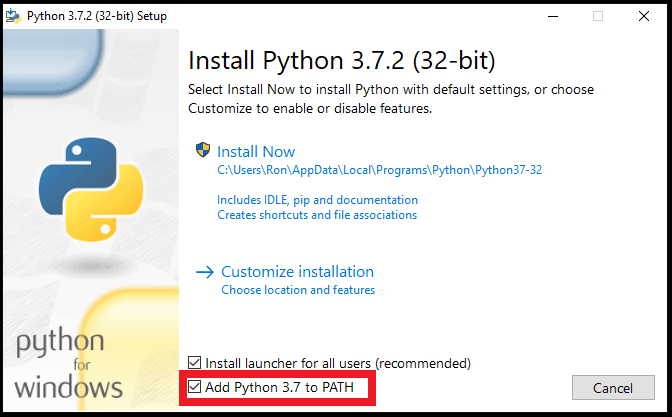
The Python PATH screenshot is retained as historical media, not a recommendation to install that Python version:
Encoding
The following is the authors’ historical 3 September 2023 recipe, retained for provenance. It targets a particular aom-av1-lavish/Av1an combination; no current build is claimed to accept all these flags:
av1an -x 300 -i input.mkv -w 4 -e aom -c mkvmerge --resume -m lsmash --photon-noise=10 --set-thread-affinity=2 --verbose -a " -an " -f " -an " -v " --bit-depth=10 --cpu-used=4 --end-usage=q --cq-level=24 --threads=2 --tile-columns=0 --tile-rows=0 --lag-in-frames=64 --tune-content=psy --tune=ssim --enable-keyframe-filtering=1 --disable-kf --kf-max-dist=9999 --enable-qm=1 --deltaq-mode=0 --aq-mode=0 --quant-b-adapt=1 --enable-fwd-kf=0 --arnr-strength=1 --sb-size=dynamic --enable-dnl-denoising=0 " -o "output.mkv"Version-specific parameters
The explanations below describe the historical example. For new commands use the installed encoder’s help and release documentation. Community recipes are test candidates, not universal quality settings.
Now let’s dissect it one-by-one
Av1an parameters:
-
-iInput. -
-x 300Set the historical maximum scene length to 300 frames. Longer chunks can affect compression, parallelism, and seeking; they do not guarantee higher quality. -
-w 4Specifies the amount of “workers” or amount of encoders working on the video. -
--verboseSets logging to verbose. -
--resumeResumes the encode even when you haven’t encoded yet. I strongly recommend leaving this if you resume a lot since you can accidentally delete your whole progress (There’s no delete confirmation feature.. yet) if you “resumed” without the parameter in place. -
-e aomSpecifies we’re using aomenc encoder which should be the default option. -
-c mkvmergeSpecifies we’re using mkvmerge (MKVToolNix) to concatenate the parts when done, you can specify with ffmpeg if you want to but validate the chosen concatenation method and output streams. -
-m lsmashSelected the historical L-SMASH backend. Backend compatibility, frame accuracy, and speed depend on input and version; this article does not establish that other backends inherently lag or are inferior. -
-f " -an "-fStands for ffmpeg parameters,-anis to remove all audio since its better to encode and merge it separately. To crop use-f " -an -vf crop=1920:800 "for example to crop the video to 1920x800. -
-v " "Is where you put the encoder’s parameters in. -
-a " -an "FFmpeg audio encoding options, we’re removing it cause we can always add it later. But if you want to, you can also encode directly. Here’s an example for encoding to Opus using libopus assuming stereo:-a " -c:a libopus -b:a 128k ". -
--photon-noise=10AV1 grain synthesis, which is a technique where the encoder puts fake grain in so it looks more natural and potentially hiding video artifacts (cause grain is hard to encode and explodes bitrate usage because of their randomness), 5-8 for almost none to little grain, 10-14 for medium, 15+ heavy, 20+ extremely heavy, 30+ for extremely grainy 90s live action films. -
--set-thread-affinity=2Pins the thread to the encoder, aligns with--threads=2in the encoder parameter so set them accordingly.
aomenc parameters:
-
--bit-depth=10Selected 10-bit coding. It can help precision and banding but does not guarantee smaller files or target compatibility; confirm the output profile and playback path. -
--cpu-used=4Selected the historical CPU-effort setting. Valid ranges and speed/quality tradeoffs depend on encoder build and usage mode; 4 is not a universal sweet spot. -
--end-usage=q --cq-level=24Selected libaom’s constant-quality mode and CQ level 24. CQ is not numerically equivalent to x264/x265 CRF 24. -
--threads=2Sets the amount of threads the encoder can use, aligns with--set-thread-affinityin Av1an. -
--tile-columns=0 --tile-rows=0This is the tiles options, where the encoder splits the videos into tiles to encode faster, see the image below (Yellow lines):

Tile tradeoffs
Tile row/column controls use logarithmic counts in this interface: 0 means one, 1 means two, and 2 means four. Additional tiles may improve decoder parallelism at a compression cost. Test the intended decoder; resolution alone does not determine the right setting.
-
--lag-in-frames=64Similar to x264/x265rc-lookahead. Sets a number of frames to look ahead for frametype and ratecontrol, allowing for better compression decision making. Setting to a value greater than 64 is generally not considered useful. -
--aq-modeadaptive quantization mode; 0 was the author’s historical choice, not a demonstrated general optimum -
--tune-content=psy --tune=ssimAs the name suggests they are tunes that affect the video output, for the better, and for the worst
Historical fork tunes
The example’s psy, lavish, and related tuning advice was specific to aom-av1-lavish at the time. These names and the old CQ30 rule are not portable upstream guidance. Inspect the exact fork revision for reproduction; use current encoder documentation for new work.
-
--enable-keyframe-filtering=1Used the historical value 1. The old compatibility report was specific to that pipeline; it does not establish a current universal limitation. -
--sb-size=dynamicAllows the encoder to use 128x128 block partitioning besides 64x64 which gives an efficiency boost, ignore it. -
--deltaq-modewas set to 0 in the historical recipe; a universal improvement was not demonstrated. -
--arnr-strength=1Controls how strong the filtering will be, 1 is good for 3D Pixar CGI-like and 2D animation, use 4 if you’re doing live action content. Using maximum at higher bitrates would just result in a blurry mess. -
--disable-kf --enable-fwd-kf=0We’re disabling keyframes cause Av1an already did scene detection, so we wont have to.. And it speeds things up. -
--kf-max-dist=9999Maximum keyframe interval, we’re setting it at the highest possible value since av1an’s scene detection keyframe interval is already 240 by default -
--enable-chroma-deltaq=1 --enable-qm=1 --quant-b-adapt=1Fork/version-specific choices from the old recipe. Their gains, costs, and interactions require measurement. -
--enable-dnl-denoising=0Disables the encoder’s built-in denoising technique when grain synthesis is enabled, you can optionally set it to 1 when you have a pretty noisy video since it works quite well.
Concatenation Error on Linux
The old guide suggested raising the file-descriptor limit and manually invoking a saved mkvmerge options file. That was a workaround for its historical pipeline, not a general fix. Inspect the actual error, current Av1an resume behavior, and generated files before changing process limits or manually concatenating chunks.
Merging Everything
Verify the output streams explicitly: the historical command disables audio, and subtitles should not be assumed preserved. Use audio and subtitle mapping when adding or copying them. Select a compatible container and test playback; MP4 and Matroska have different subtitle and codec mappings. The old blanket statement that Opus support is experimental is not a current compatibility test.
Additional historical fork settings
-
--denoise-noise-level=10Alternative tophoton-noise, slower than photon-noise and is the OG grain synthesis method, performs okay and just serves as an alternative. Don’t attempt to use it at high values (>12) since it creates noticeable grain patterns. -
--arnr-maxframesto set max reference frames that will be used to filter the encode, higher values would make the video blurrier at high fidelity but look better at lower bitrates. -
--butteraugli-resize-factor=2if you use any of the butteraugli-based tunes (lavish, butteraugli) to speed it up without much losses and--butteraugli-intensity-target=250to match the content light level.
Final Thoughts
Encoding has always been about experimentation for the best, there is really no “One size fits all” for encoding content, as they differ from scene complexity, how it’s captured (2D/Real life), film grain, dark scenes, etc. So experiment away for your specific type of content!
Guide originally hosted on https://rentry.co/AV1, rewrite and migration by Simulping.